

Choosing a scavenger hunt app for corporate events should not feel like a second job. The market is crowded with platforms that look similar on the surface but differ dramatically in how they handle app downloads, group size, customization, live data, and pricing. This guide walks through five criteria that separate a tool your team will actually use from one that collects dust after the first event.
This article is part of our scavenger hunt app guide — a complete overview of digital hunt platforms, how to choose one, and how to run your first event.
For a detailed comparison of the top platforms, see our complete corporate team building comparison guide.
Table of Contents
- Does it work without an app download?
- Can it scale to your group size?
- How customizable are the challenges?
- Does it provide real-time engagement data?
- What does the pricing look like for corporate use?
1. Does it work without an app download?
This is the single most overlooked criterion in corporate scavenger hunts. Your attendees are not going to install a dedicated app for a one-hour team building activity. They will arrive at the event, see "Download from the App Store," and mentally check out before the first challenge begins. Every minute spent on app installation is a minute of lost engagement. For corporate events where participation is voluntary or semi-mandatory, any friction at the entry point directly reduces the number of people who actually play.
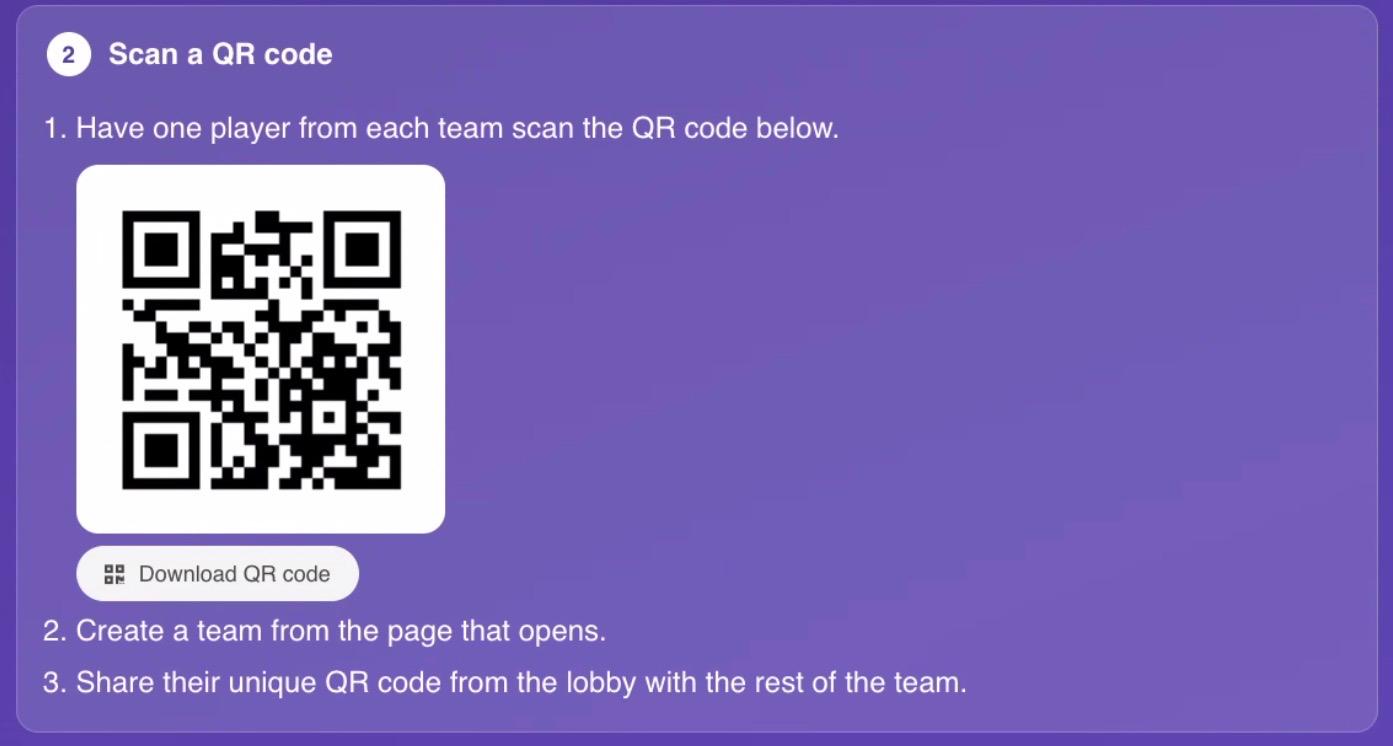
What to look for: A web-based platform that works entirely in the browser. No app store visit required. Participants should be able to join by scanning a QR code or typing a short URL. The experience must work on any device - iPhone, Android, laptop, or tablet - without the participant having to install anything. Bonus points if the platform remembers participants across events so returning players can join instantly.
Red flag: The platform requires participants to download and install a native app. This is the most common participation killer in corporate events, and it is surprisingly widespread among popular platforms.
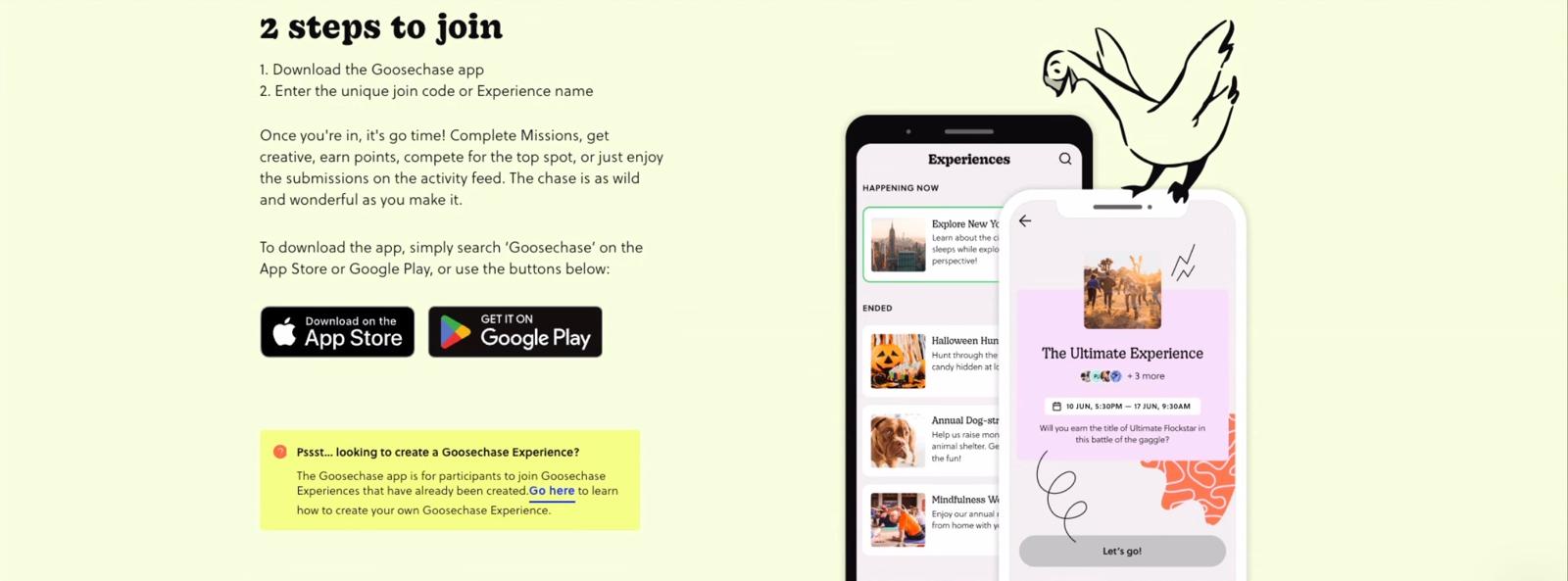
Goosechase explicitly states that "Experiences can only be played using the Goosechase App on an iOS or Android device." This means every single participant must install the app before they can join. For a corporate event with 50 or 100 attendees, that is a significant friction point. Some will skip the download entirely. Others will struggle with device compatibility or storage space. A few will have corporate-managed devices that restrict app installations. The result is a fragmented experience where some teams are playing and others are still troubleshooting downloads.
Actionbound also requires participants to download its native app to play. Scavify similarly relies on its mobile app for participation. These platforms were designed for consumer audiences who are willing to install an app for a one-time experience, but corporate attendees have different expectations. When an employee receives a calendar invite for a team building activity, their willingness to install a new app is near zero.
PlayTours takes a different approach: participants join through a browser link with no download required. The game runs in Safari, Chrome, or any modern browser on any device. This means a participant can go from receiving the invite to playing their first challenge in under 10 seconds. For corporate events where every minute counts, browser-based access is the difference between 90% participation and 50%.
2. Can it scale to your group size?
Corporate events range from a 10-person department lunch to a 500-person company offsite. The platform you choose must handle your specific group size without performance degradation or surprise cost overruns. A tool that works beautifully for 20 people may choke at 100 when the real-time leaderboard starts refreshing for every team simultaneously. The worst possible outcome is a platform crash in the middle of your flagship quarterly event.
What to look for: Clear concurrent player limits stated on the pricing page. Server capacity that handles real-time scoring and leaderboard updates for your expected group size. The ability to run multiple teams simultaneously without lag or crashes. Look for platforms that have been stress-tested at the scale you need - ask about their largest event to date.
Red flag: Pricing tiers that cap participants at 50 or charge per-seat fees that blow the budget as soon as you invite the whole company. If the pricing page does not mention scalability at all, that is also a warning sign.
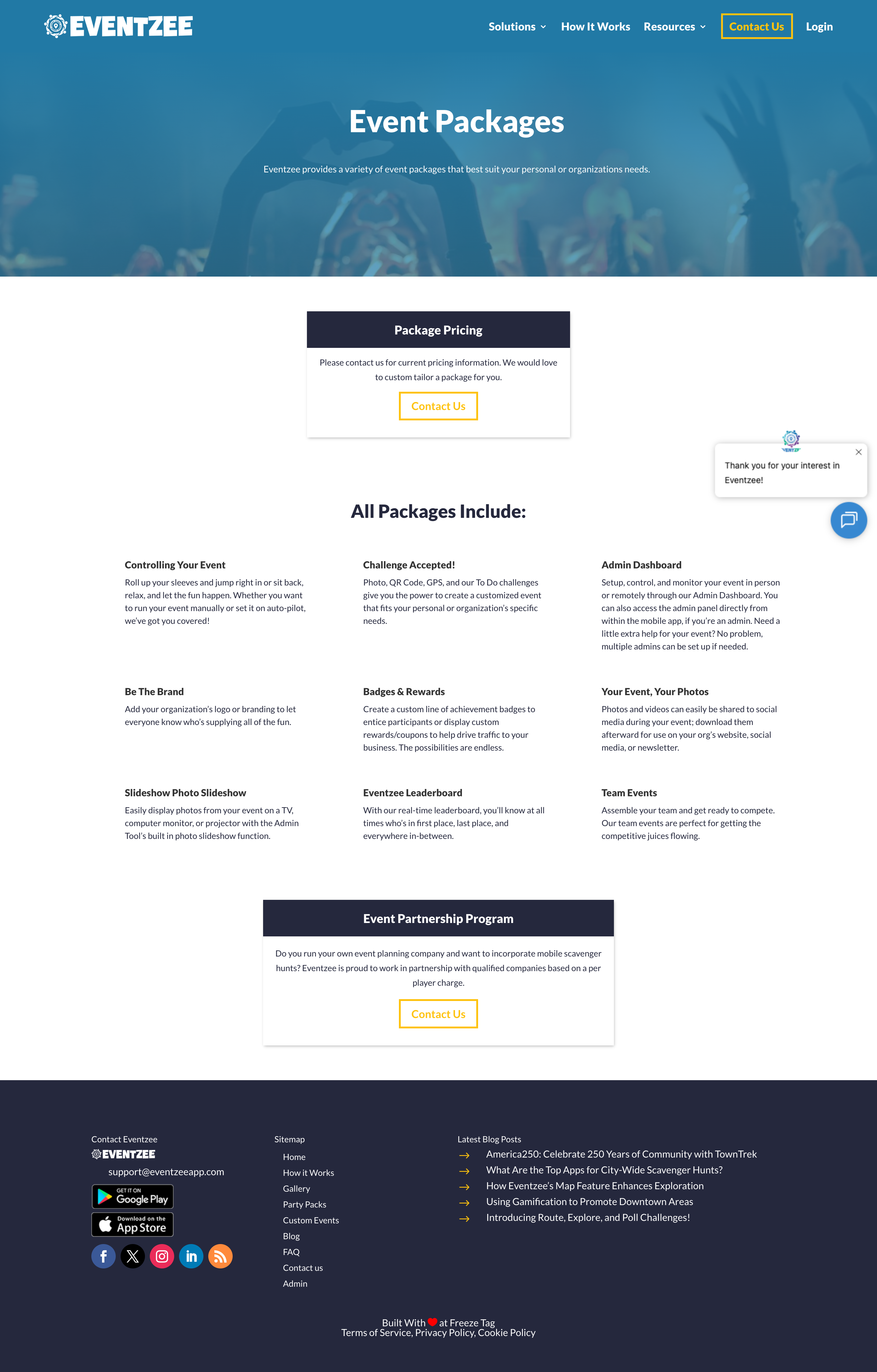
Eventzee hides its pricing behind a "contact us" form, which means you cannot evaluate scalability without a sales call. Goosechase is more transparent: its single-Experience pricing caps teams at 3 (free), 8 (Starter at $399), 20 (Professional at $649), or 35 (Growth at $1,199) per Experience. For events larger than 35 teams, you must request enterprise pricing. This per-Experience model works for one-off events but becomes expensive if you run multiple corporate events throughout the year - each event requires a separate license purchase.
Scavify also uses a contact-sales model where you specify participant count (1-100, 101-250, 251-1,000, etc.) and receive a custom quote. There are no published per-seat rates, making budget planning difficult for procurement teams who need line-item visibility before approving a purchase.
Actionbound's PRO license supports commercial use, but its per-Bound pricing (7 EUR per Bound for secret Bounds) adds a variable cost that scales with the number of games you create rather than the number of participants. For a company running 20 events a year, those per-Bound fees add up quickly.
The key takeaway for scalability is to look for a platform that publishes its participant limits clearly and does not penalize you for growth. If a vendor cannot tell you how many concurrent players their system supports without a sales call, assume the answer is "fewer than you need."
3. How customizable are the challenges?
Corporate events are not generic. Your company has branding guidelines, internal messaging, specific learning objectives, and a culture that should be reflected in every activity. A scavenger hunt app that only offers pre-made templates with no way to add your own content will feel like a generic icebreaker rather than a meaningful team experience. The best corporate events weave company values, inside jokes, and team-specific goals into the gameplay itself.
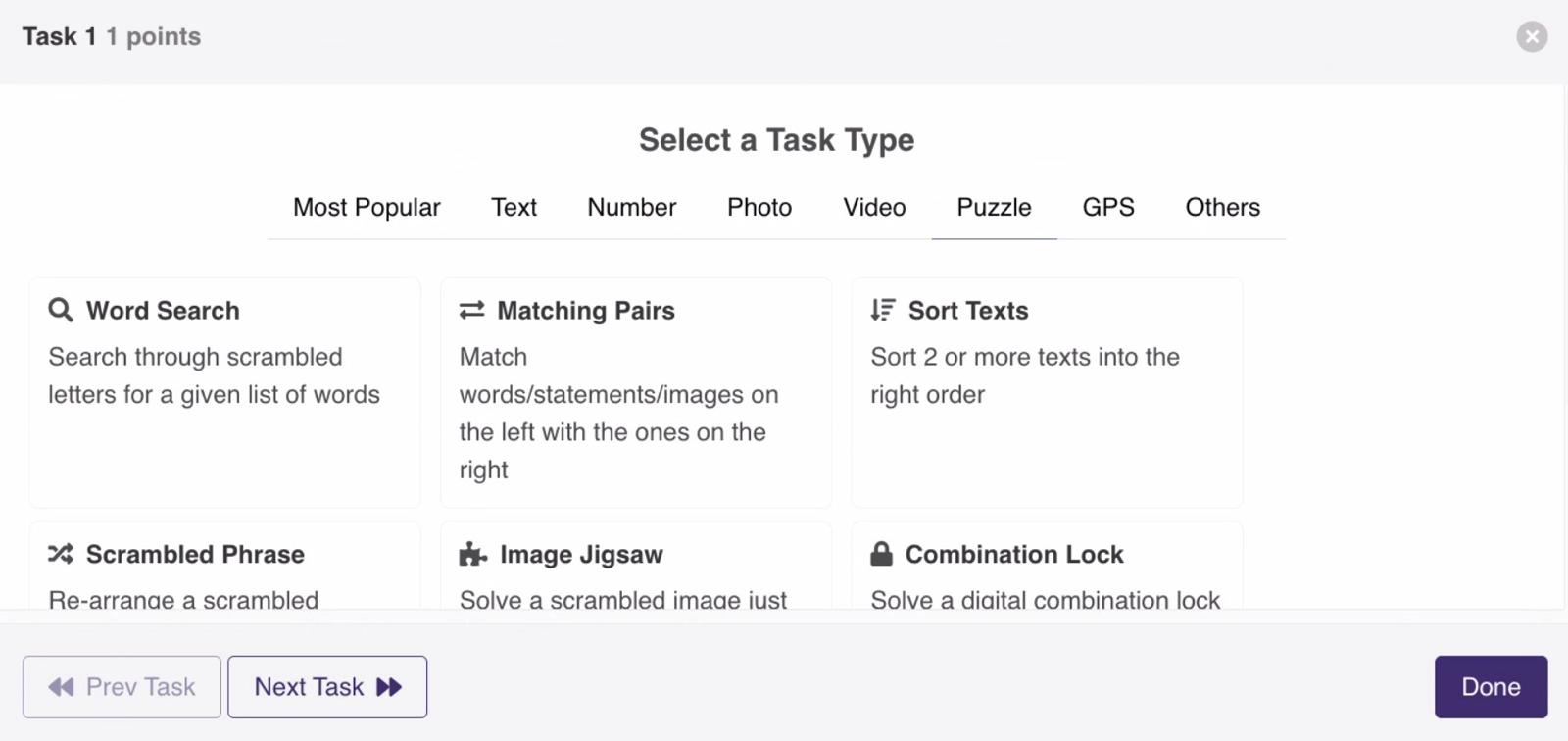
What to look for: Multiple task types (photo, video, text, GPS, QR code, multiple choice, audio, puzzles). The ability to add your own content, questions, and challenges from scratch rather than being limited to templates. White-label options or branded game pages that reflect your company's identity. The ability to set custom scoring rules, time limits, and progression logic.
Red flag: The platform only offers pre-made templates with no way to add your own content or branding. If you cannot write your own questions or upload your own images, the platform is not built for corporate use.
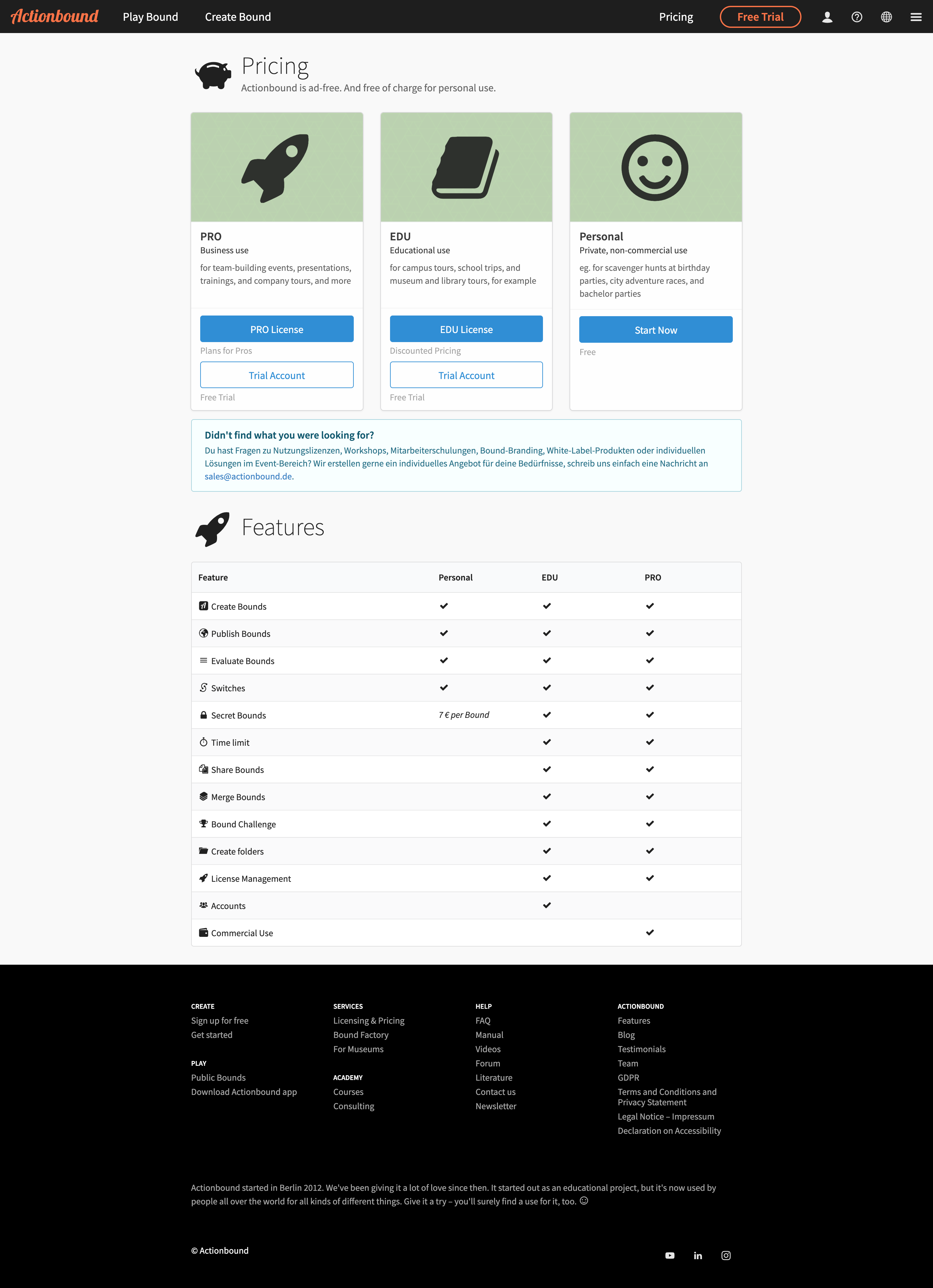
Actionbound offers a solid range of task types including GPS check-ins, quizzes, QR codes, and multimedia content. Its "Bound" structure lets creators build custom routes with their own content. However, Actionbound charges 7 EUR per Bound for commercial use on top of its PRO license, which adds up quickly for organizations running multiple events. The platform also lacks some of the more advanced task types like AI-judged photo validation or combination locks that corporate event planners increasingly expect.
Goosechase provides mission types including photo, video, text, GPS location, and multiple choice. Its template library of 250+ pre-built Experiences is useful for inspiration, but the real value for corporate buyers is in creating custom missions from scratch. Goosechase supports custom branding on paid plans, including logo placement and color schemes. However, its mission types are more limited compared to platforms that offer 20+ interaction formats.
When evaluating customization, ask yourself: can I build a game that looks and feels like my company, or am I limited to filling in the blanks of someone else's template? The platforms that let you control the full experience - from task types to visual design to scoring logic - will always produce more engaging corporate events than those that constrain you to a fixed format.
4. Does it provide real-time engagement data?
HR managers and event organizers do not want to wait until after the event to know whether people are participating. Real-time data lets you see which teams are engaged, which challenges are causing bottlenecks, and whether the event is hitting its participation goals while it is still happening. This live visibility also lets facilitators intervene when a team is stuck or when a particular challenge is confusing multiple groups.
What to look for: A live facilitator dashboard showing team scores, individual contributions, completion rates per challenge, and real-time leaderboard updates. The ability to view photo, video, and text submissions as they come in. Exportable reports for post-event analysis and reporting to stakeholders.
Red flag: No facilitator dashboard at all, or only post-event CSV exports with no live view during the event. If you cannot see what is happening while the game is running, you are flying blind.
Scavify includes dashboard access in all its programs, giving organizers the ability to build, launch, and monitor programs through a central dashboard. It also offers advanced analytics with detailed breakdowns of activity and data associated with each program, participant, and challenge. Photo downloads and slideshow features are included for sharing event highlights with leadership after the event.
Goosechase provides a real-time activity feed, automatic scoring and leaderboard, and submission downloads. Its co-managing feature allows multiple organizers to monitor the same Experience simultaneously, which is useful for large corporate events with multiple facilitators spread across different locations. The activity feed shows submissions as they happen, giving facilitators a live pulse on engagement.
The best approach is to look for a dashboard that shows you not just scores but also completion rates per challenge, submission previews, and the ability to manually review or approve submissions in real time. This level of visibility turns a facilitator from a passive observer into an active participant in the event's success.
5. What does the pricing look like for corporate use?
Corporate budgets need predictability. Hidden per-player fees, mandatory annual commitments, and opaque "contact sales" pricing models make it difficult to plan and get approval from procurement teams. The best pricing model for corporate buyers is one that is transparent, flexible, and scales with usage without punishing growth. You should be able to estimate your annual cost in under five minutes without talking to a sales representative.
What to look for: Transparent pricing published on the website. A free plan that supports real corporate use: up to 25 concurrent active devices, full features, and commercial use allowed while you evaluate or run smaller events. Monthly billing options for organizations that prefer operational expense over capital expense. Volume discounts for multiple events or large groups.
Red flag: Pricing hidden behind "contact sales" with no published rates, or mandatory annual contracts that lock you in before you have tested the platform with a real event. If a vendor will not tell you what they charge on their website, assume the pricing is higher than you want to pay.
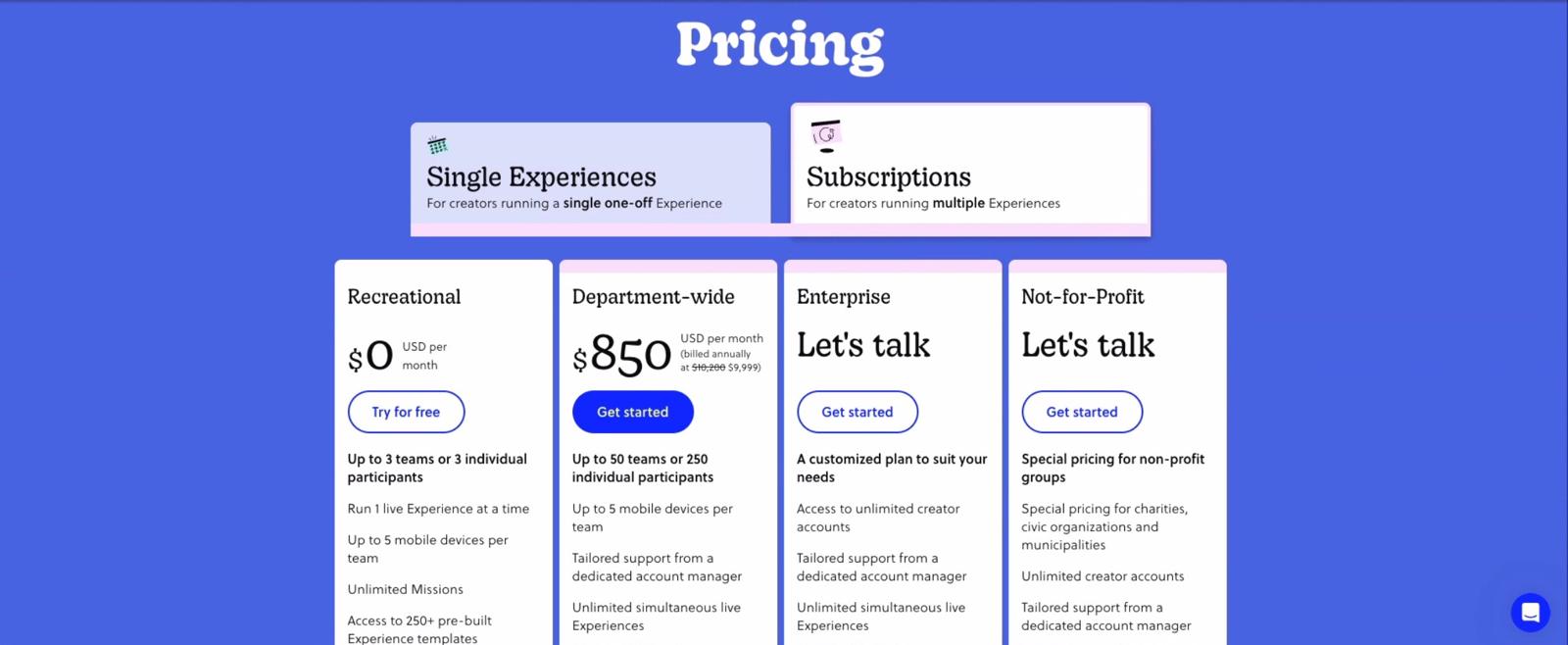
Goosechase offers the most transparent pricing among the major competitors. Its single-Experience model starts at $399 (Starter, up to 8 teams), $649 (Professional, up to 20 teams), and $1,199 (Growth, up to 35 teams). For organizations running multiple events, subscription pricing is available but requires contacting sales. The free tier supports up to 3 teams, which is useful for small trials but insufficient for most corporate events. The per-Experience model means a company running 10 events a year at the Professional tier would spend $6,490 annually on licenses alone.
Eventzee and Scavify both hide their pricing behind contact forms. Eventzee states "Please contact us for current pricing information" with no published rates at all. Scavify asks for participant count and then provides a custom quote. This opacity makes it hard for corporate buyers to compare options without going through a sales process for each vendor, which is time-consuming when you are evaluating multiple platforms.
Actionbound offers a PRO license for business use with a free trial available. Its per-Bound pricing (7 EUR per Bound for secret Bounds) adds a variable cost component that can be hard to predict for organizations running many events. The platform also charges for features like time limits and bound merging on top of the base license.
PlayTours offers a free plan (25 concurrent active devices, full features, commercial use allowed) and transparent paid tiers when you scale past that cap. There are no per-player fees, no mandatory annual contracts, and no hidden costs. Corporate buyers can test the platform with a real event before committing, and the pricing scales predictably whether you are running a 20-person team building session or a 300-person company offsite.
Making Your Decision
Before you commit to any scavenger hunt app for corporate events, ask yourself these three questions:
- Will my attendees actually use it? If the platform requires an app download, expect 30-50% drop-off before the first challenge. Browser-based access is the single highest-leverage decision you can make for participation rates. Test this with a small pilot before scaling to a company-wide event.
- Does the pricing match how we buy? If your organization needs predictable costs across multiple events, avoid platforms that hide pricing behind sales calls or charge per-Experience fees that multiply with every event. Look for transparent, published pricing that you can budget against.
- Can I make it ours? If the event needs to reflect your company's brand, culture, or training content, choose a platform that lets you customize everything from task types to visual design. A generic template-based experience will feel like a generic template-based experience.
Once you have narrowed down your options, see our detailed comparison of the top scavenger hunt apps for corporate team building to see how the leading platforms stack up against each other feature by feature.
SOURCES
- Goosechase Pricing Page - https://goosechase.com/pricing - Verified April 28, 2026
- Eventzee Pricing Page - https://eventzeeapp.com/pricing/ - Verified April 28, 2026
- Scavify Pricing Page - https://www.scavify.com/pricing - Verified April 28, 2026
- Actionbound Pricing Page - https://en.actionbound.com/pricing - Verified April 28, 2026
- PlayTours Game Builder Features - Internal reference - Verified April 28, 2026